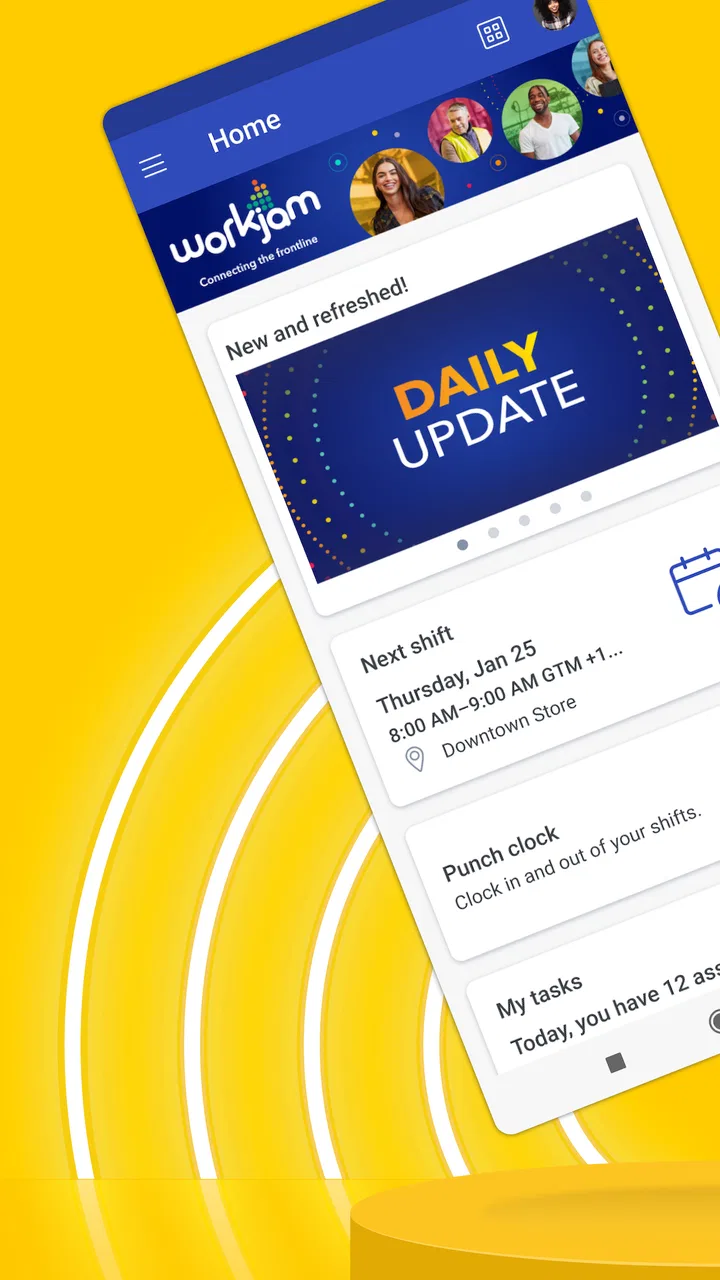
WorkJam
- 4.4
- Rating
- 1.00M
- Installs
- Free
- Price

 Analysis by App-foxy
WorkJam is the kind of business app that makes the most sense when your working day is built around changing shifts, short updates, and a team that is not always in the same place. I approached it as a worker rather than as someone managing a large office, and that perspective matters: the value is less about flashy tools and more about putting work information where hourly employees can reach it during a busy day. Its strongest idea is simple access to work coordination from a phone, especially when a paper noticeboard, a group chat, or a chain of messages starts becoming difficult to follow.
Developed by WorkJam, Inc., the app sits in the business category and is free to use. It is available for an Everyone audience, has been around since September 3, 2015, and its current version is 2026.6.18. The Android requirement begins at version 7.0, which makes it approachable for people using older devices as well as newer phones. Its store presence is also substantial, with over a million installs, an average rating of 4.5, around sixteen thousand ratings, and roughly eleven hundred written reviews. Those figures suggest that it is not a niche experiment, but the real question is whether its work-focused design fits your routine.
How WorkJam feels when your workday depends on a connection
I find it helps to think about connectivity before a shift becomes urgent, rather than waiting for a schedule question to surface in a weak-signal spot. A quick check from a dependable connection can give me a useful starting point, while a clear backup contact matters if a later change needs immediate confirmation. That leads to the bigger question of how to use the app sensibly when the workday itself depends on a phone connection.
You May Also Like

 Blood Strike: 2.5 Anniversary
Blood Strike’s Loadouts Turn Every Drop Into a Tactical Gamble
A close look at Blood Strike’s custom loadouts: how fast access to signature weapons reshapes its battle royale rhythm, rewards preparation, and narrows the gap between fights.

 Pandora - Music & Podcasts
Pandora’s Music Is Easy to Start, but Harder to Recover
Pandora’s strength is its low-effort path from a seed to a station. Its weak spot is how much confidence it asks you to place in connection, setup, and quiet recovery.

 8 Ball Pool
 Is Built on Rivalries, Rematches, and Routine
A close look at the rivalries, rematches, shared routines, and unanswered safety questions that turn a quick pool match into a persistent mobile community.

 Samsung Music
’s Quiet Strength Is Playing What You Already Own
Its reach comes less from spectacle than from dependable access to a personal library. That simplicity is both the app’s strongest retention engine and its ceiling.

 AccuWeather: Weather Radar
AccuWeather Review: A Quick, Clear Forecast for Everyday Decisions
For everyday plans, the best forecast is the one you can understand quickly. AccuWeather makes rain timing, radar, and local conditions easy to act on, with a few trade-offs.

 Hill Climb Racing
Why Hill Climb Racing Still Turns Crashes Into One More Run
A tiny car, a bumpy hill and one more upgrade: Hill Climb Racing keeps resurfacing because its simple chaos makes every near-miss feel personal.
More From Our News Desk



The first useful distinction: this is not just another chat app
Many hourly workers already have a mixture of text messages, email, printed schedules, and conversations with supervisors. That mixture can work for a small team, but it creates uncertainty as soon as a shift changes or an important message gets buried. WorkJam is designed around the working relationship itself, so the app feels more purposeful than a general messaging service. I would not open it for casual conversation; I would open it to check what is happening with work and what I need to do next.
That difference is important when deciding whether to install it. If your employer does not use WorkJam as part of its staff process, the app will not magically replace the tools your workplace has chosen. Its usefulness depends on being connected to an organization’s way of handling hourly work and shifts. For someone whose employer actively relies on it, that shared setup can reduce scattered communication. For an independent freelancer or a small team that already handles everything comfortably through email, a calendar, or a familiar chat group, it may feel like an extra destination rather than a solution.
Network-dependent moments are where the app earns its place
The most important practical issue is connectivity. A work app can be well designed and still become frustrating when you are in a basement, a stockroom, a crowded venue, or a building with weak mobile reception. WorkJam’s usefulness is tied to being able to reach current work information when you need it. That makes a stable connection particularly relevant when checking a schedule before leaving home, responding to a workplace update, or confirming what has changed during the day.
I would build a small habit around that dependence. Before leaving for work, I would check the app while connected to a reliable network rather than waiting until I was standing outside the building or already commuting. If a shift or instruction matters, I would give the screen enough time to load instead of assuming that a partial view represents the latest information. This is not glamorous advice, but it is exactly the sort of habit that prevents a connectivity problem from turning into a missed change.
The same consideration applies at the end of a shift. If you need to review something before heading home, do it while you still have dependable reception. A phone that shows an old screen can create false confidence, particularly when schedules are adjusted at short notice. I would treat the app as a live work channel, not as a permanent paper copy of everything I may need later.
Using it in motion requires a different rhythm
WorkJam is most convincing on a phone because hourly work rarely happens at a desk. A retail employee may check information before opening, a hospitality worker may look at a change between tasks, and a field employee may need to consult work details while moving between locations. In those situations, the phone is already the object people carry, so a dedicated work app is more natural than expecting everyone to sit down at a computer.
That convenience has a limit: mobile access does not make every moment a good moment to use a screen. I would avoid trying to read important updates while walking through a busy workplace or while handling customers, equipment, or stock. The app can bring information closer, but the user still needs a safe pause to interpret it. A quick glance is suitable for a simple confirmation; a complicated change deserves a quiet minute and a reliable signal.
There is also a social advantage to a phone-centered workflow. Workers who do not regularly sit at a company computer are less likely to miss information simply because they are away from a desk. That can make communication feel more even across different roles. At the same time, phone notifications can become intrusive if every update feels urgent. I would be selective about when I check the app and avoid treating every alert as something that must interrupt a customer interaction or a personal moment.
A realistic shift-change scenario
Imagine finishing a late shift when a supervisor needs coverage the following morning. In an informal setup, the request might arrive in a group chat where it competes with jokes, unrelated questions, and messages from people who are not working that day. With WorkJam as the shared workplace channel, I would expect the request to be easier to associate with my work context. I could check it before going to sleep, consider whether the change fits my availability, and respond through the process my employer has established.
The important benefit is not merely speed. It is reducing ambiguity. A clear work-focused message can make it easier to distinguish an official update from a colleague’s suggestion. However, I would still read the wording carefully. A schedule display or notification is not a substitute for understanding whether a change is confirmed, requested, or awaiting approval. The app can organize communication, but it cannot remove the need for the worker to verify what the message actually means.
What happens when the connection fails?
The awkward moments are usually not dramatic crashes. They are ordinary interruptions: a screen takes too long to load, reception disappears in a service area, or an update arrives while the phone is switching between networks. In those situations, I would avoid repeatedly tapping the same control. First I would check whether other apps can reach the internet, then try again from a stronger location. That simple sequence helps distinguish a local signal problem from an issue with the app or the workplace system.
If I had to rely on a schedule or instruction during a weak-signal period, I would prepare before entering that area. Checking the relevant information earlier is sensible, but I would not assume that a previously viewed screen includes a later change. For anything consequential, such as a shift adjustment or a request that affects attendance, I would use an available workplace contact as a backup if the app cannot confirm the current state. That is not a criticism unique to WorkJam; it is a sensible safeguard for any connected work platform.
Recovery is also about avoiding duplicate actions. If a connection drops after you submit something, do not immediately send it again several times. Wait until the app or your workplace process gives you a clear result, because repeated attempts can create confusion. When the network returns, review the current information rather than assuming that the first attempt failed. This is one of the less obvious trade-offs of mobile work tools: convenience is high, but a rushed retry can be less reliable than a brief pause.
Keeping mobile use sensible with limited data
People often think about data-conscious use only when an app streams video or downloads large files. A shift-management tool is usually lighter in feel, but frequent checking can still matter if your mobile plan is limited or your workplace has poor Wi-Fi. I would use a dependable Wi-Fi connection for routine review when convenient, especially before a busy week, while reserving mobile data for quick checks when I am away from home or work.
Notifications deserve attention too. A phone that wakes up for every minor update can encourage unnecessary opening and refreshing. I would keep alerts useful rather than allowing them to turn the app into constant background noise. The goal is not to avoid work information; it is to make the important information noticeable without making every phone vibration feel like an emergency.
There is a privacy angle to this habit as well. A shared or family phone should not be left open on workplace information, and I would be careful about reading messages aloud or displaying them in public. Work details can include schedules and internal instructions, so using the app thoughtfully means considering who can see the screen. The app’s business purpose makes that small bit of phone discipline worthwhile.
Where it is better than the usual alternatives
Compared with a paper schedule, WorkJam is more adaptable when work changes after the schedule is printed. Compared with email, it is more naturally suited to people who are not checking an inbox throughout the day. Compared with a general chat app, it keeps the work purpose closer to the center instead of mixing it with unrelated conversation. Those are meaningful advantages for teams with rotating shifts and employees who spend most of their time away from a desk.
It is not automatically better than every alternative. A small office with fixed hours may find a shared calendar easier to understand. A team that needs long documents, detailed project discussions, or extensive file collaboration may prefer a broader workplace platform. A personal calendar can remain useful for combining work with family commitments, appointments, and travel. I see WorkJam as a focused layer for hourly work rather than a complete replacement for every productivity tool.
The comparison also depends on how consistently a workplace uses it. A dedicated platform only reduces confusion when managers and employees follow the same process. If one supervisor posts changes in WorkJam, another sends texts, and a third relies on paper, the app cannot solve the underlying inconsistency. In that situation, the best improvement would be agreement about where official information belongs, not simply asking workers to install another app.
Small workflow choices that make a real difference
My first practical tip would be to check the app at predictable points: before commuting, before a shift begins, and after a known period when changes are likely. That is more efficient than opening it constantly. It also gives you a clearer mental picture of what was current when you checked, which helps if a later message changes the plan.
Second, I would separate “I saw this” from “I understand what I must do.” A notification may be enough to tell you that something changed, but the full context may require opening the relevant work information. If the wording affects your arrival time, location, or responsibilities, read beyond the first line and make sure the action is clear before moving on.
Third, I would make connectivity part of the commute plan. If the route includes a train tunnel, rural stretch, or building known for weak reception, review essential details beforehand. This is a more reliable approach than discovering the problem at the exact moment a manager expects an answer. The app is most helpful when it is used proactively, not only after confusion appears.
Finally, I would keep a personal calendar for the parts of life WorkJam is not meant to manage. Once a shift is confirmed, adding it to a private calendar can help you see childcare, appointments, and travel alongside work. That is not duplicating the platform unnecessarily; it is recognizing that a work-management app and a personal planning system answer different questions.
Who should use it, and who should look elsewhere?
I would recommend WorkJam to hourly employees whose employer has adopted it seriously and who need mobile access to changing work information. It is especially appealing if you rarely use a company computer, if shifts move around, or if paper notices and scattered messages regularly create uncertainty. The free price also removes a direct cost barrier for the individual worker, although the quality of the experience still depends on the organization’s setup and communication habits.
I would be more cautious if your workplace only uses the app occasionally. An app that contains some information while other important details remain in texts or email can increase, rather than reduce, the need to check multiple places. I would also skip it as a personal productivity download if you are looking for a general task manager, a full calendar replacement, or a broad team collaboration suite. Its focus is hourly work and shift management, and that focus is both its strength and its boundary.
People with unreliable connectivity should not automatically reject it, but they should plan around that weakness. If your job takes you into areas where you cannot regularly connect, you need a dependable backup communication routine for urgent changes. Likewise, anyone who dislikes phone-based work should consider whether their employer offers another official way to access the same information. Convenience is valuable, but not when it forces you to depend on a device in situations where using one is impractical.
My connectivity verdict
After looking at WorkJam through the realities of mobile work, I see it as a practical business app rather than an app that tries to do everything. Its best use is giving hourly teams a focused place to manage the flow of work from phones that employees already carry. The experience is strongest when the employer uses it consistently, workers check it at sensible moments, and everyone understands which updates are official.
The main caution is equally clear: treat connectivity as part of the workflow. Check important information before entering weak-signal areas, avoid assuming an old screen reflects a new decision, and use a workplace backup when a failed connection affects attendance or responsibilities. Those habits do not diminish the app; they make its mobile design more dependable in real life.
With its free access, broad device compatibility beginning at Android 7.0, Everyone rating, and established presence under WorkJam, Inc., it is an easy app to try when your employer already relies on it. I would recommend it to shift-based workers who want less dependence on paper, inboxes, and informal chat. My final view is that WorkJam is worthwhile when it becomes the shared source of work information, but much less compelling when it is only one more place to search.
FAQs for WorkJam
01What is WorkJam and how does it benefit employees?
WorkJam is a digital workplace platform designed to enhance employee engagement and productivity. It provides tools for communication, scheduling, training, and task management. Employees benefit by having a centralized platform to manage their work schedules, access training materials, and communicate with their team, leading to improved work-life balance and job satisfaction.
02How secure is the data on WorkJam?
WorkJam employs robust security measures to protect user data, including encryption and compliance with industry standards. Data privacy is prioritized, and the platform regularly updates its security protocols to defend against potential threats. Users can trust that their personal and work-related information is safeguarded against unauthorized access.
03Is WorkJam easy to integrate with existing systems?
Yes, WorkJam is designed to seamlessly integrate with various existing systems such as payroll, HR, and point-of-sale systems. This integration ensures that data flows smoothly between platforms, reducing redundancy and increasing efficiency. The setup process is straightforward, often with support from WorkJam’s integration specialists.
04What devices and platforms support WorkJam?
WorkJam is available on both Android and iOS devices, ensuring accessibility across a wide range of smartphones and tablets. The app can also be accessed via web browsers on desktop computers, providing flexibility for users to engage with the platform from any location, whether at home or on the go.
05Can WorkJam be customized to fit specific business needs?
Absolutely, WorkJam offers customizable features to suit the unique needs of different businesses. Companies can tailor the platform’s functionalities, such as scheduling and task management, to align with their specific operational requirements. This customization helps businesses optimize the platform to enhance employee efficiency and engagement effectively.
Pros
- User-friendly interface enhances productivity.
- Seamless communication between teams.
- Efficient scheduling and shift management.
- Access to training and development resources.
- Mobile access for on-the-go updates.
Cons
- Limited offline functionality.
- Some features require premium access.
- Occasional sync issues reported.
- Initial setup can be time-consuming.
- Notifications can be overwhelming.

WorkJam
Gallery